


$20.00
✅ One-Time Purchase · 🔓 Unlimited Sites
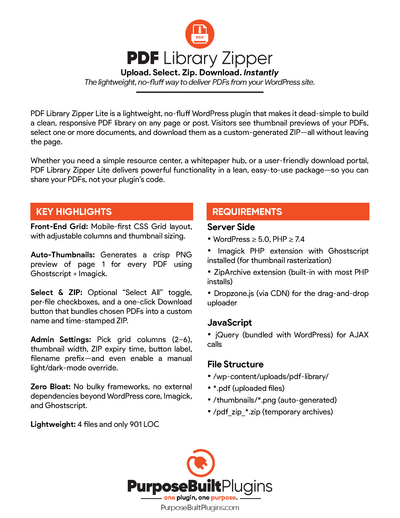
PDF Library Zipper is a lightweight WordPress plugin that makes it dead-simple to create a clean, responsive PDF library on any page or post. Site visitors can browse thumbnails (auto-generated from the first page of each PDF), select one or more documents, and download them as a single ZIP file—all without leaving the page. Every ZIP is generated instantly and securely on the fly, keeping things fast and clutter-free for your users.
DEMO
Shortcode [ pdf_library_zipper ]
On the admin side, managing your PDF library is just as easy. Upload new files with drag-and-drop, let the plugin handle thumbnail creation, and delete outdated PDFs or images with one click. Security is built-in: uploads are sanitized, only allowed file types are accepted, and all actions are restricted to admins. Temporary ZIP files are automatically cleaned up after 1 hour, ensuring your server stays tidy with zero extra effort. Whether you’re building a resource center, document hub, or sharing internal files, PDF Library Zipper keeps things simple, efficient, and truly WordPress-native.
Key Highlights:
- Front‑end grid: Mobile‑first CSS Grid layout, with adjustable columns and thumbnail sizing.
- Auto‑thumbnails: Generates a crisp PNG preview of page 1 for every PDF using Ghostscript + Imagick.
- Select & ZIP: Optional “Select All” toggle, per‐file checkboxes, and a one‑click Download button that bundles chosen PDFs into a custom name and time‑stamped ZIP.
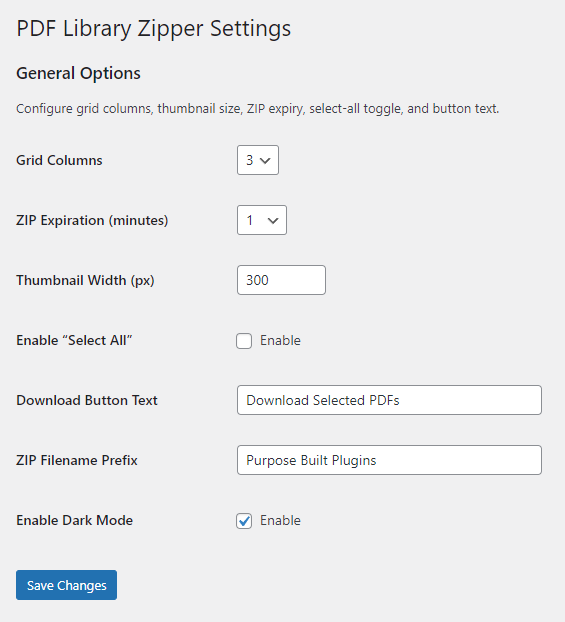
- Admin settings: Pick grid columns (2–6), thumbnail width, ZIP expiry time, button label, filename prefix—and even enable a manual light/dark‑mode override.
- Zero bloat: No bulky frameworks, no external dependencies beyond WordPress core, Imagick, and Ghostscript.
Whether you need a simple resource center, a whitepaper hub, or a user‑friendly download portal, PDF Library Zipper Lite delivers powerful functionality in a lean, easy‑to‑use package—so you can share your PDFs, not your plugin’s code.
Features
Core PDF Library & ZIP Download
Auto‑expiring ZIP files, purged after a configurable number of minutes
Drag‑and‑drop PDF upload in the admin area (via Dropzone.js)
Automatic PNG thumbnail generation from the first page of each PDF (via Ghostscript + Imagick)
Admin bulk‑delete of PDFs (and their thumbnails)
Frontend grid display of all uploaded PDFs with thumbnails and filenames
Checkboxes per PDF and an optional “Select All” toggle
Dynamic ZIP creation containing only the selected PDFs, with a custom filename prefix and timestamp
Responsive & Accessible UI
Mobile‑first, CSS Grid layout that collapses to one column on narrow viewports
Centered Download button with adjustable top spacing
Dark‑mode support, toggled automatically via prefers-color-scheme (and can be enabled/disabled in settings)
Requirements
Server‑side
– WordPress ≥ 5.0, PHP ≥ 7.4
– Imagick PHP extension with Ghostscript installed (for thumbnail rasterization)
– ZipArchive extension (built‑in with most PHP installs)
– Dropzone.js (via CDN) for the drag‑and‑drop uploader
– jQuery (bundled with WordPress) for AJAX calls
File Structure
/wp-content/uploads/pdf-library/
*.pdf(uploaded files)/thumbnails/*.png(auto‑generated)/pdf_zip_*.zip(temporary archives)